
The procedure is valid for the following configurations:
All variants of SP9EX1, SP9EX2 and SC9EX1
https://bartec.com/products-solutions/product-finder/enterprise-mobility/smartphones-cameras/
- BARTEC SP9EX1 Smartphone
- BARTEC SP9EX1 Smartphone Cam version (no cellular network)
- BARTEC SP9EX1 Smartphone No Cam version
- BARTEC SP9EX2 Smartphone
- BARTEC SC9EX1 Smartscanner
- BARTEC SC9EX1 Smartscanner WLAN version (no cellular network)
It may happen that batteries in devices left unused for extended periods undergo deep discharge and functionally shut down. A battery in this shut-down state is not defective.
However, attempting to reactivate it by charging via a USB-C cable or by charging it while it remains installed in the device within a charging station will not successfully reactivate the battery.
However, the battery can be reactivated from this state.
The following methods are available for reactivating a battery.
- Use of a charging station: The battery can be reactivated by placing it in the charging bay.
Reactivation works only when the battery has been removed from the device and is being charged in the separate battery charging slot. After approximately 30 minutes, the battery can be reinserted into the device, and charging can be continued in the charging station or via the USB-C cable.
https://bartec.com/products-solutions/product-finder/enterprise-mobility/enterprise-mobility-accessories/accessories-smartphones-cameras/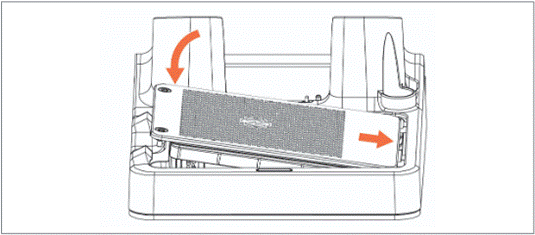
- Send the battery to a BARTEC service center.
BARTEC service center in Germany or US.
Find more details on our homepage:
https://bartec.com/service-support/returns-repair/
To avoid this issue, we recommend following these guidelines:
- Recharge the device as soon as possible after the battery reaches 0%
- Recharge the battery to 100% and/or remove the battery from the device if you intend not to use the device for longer periods of time
- Recharge the battery to 100% and/or remove the battery from the device before storing